




Denisik
Developer
-
Joined
-
Last visited
Everything posted by Denisik
-
Попробую проработать данный вариант. По результату отпишусь
-
Почему интересно тогда красные выйграли войн больше, чем синие?🧐
-
Есть такое подозрение.
-
Поправил ,спасибо!
-
Один из которых на 5-ю точку)))
-
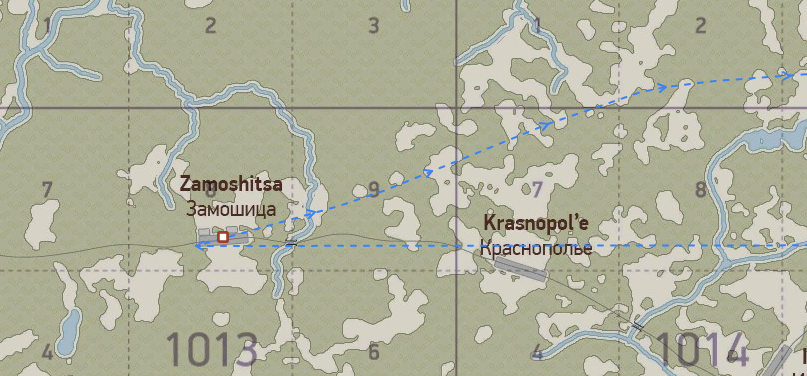
Дружище, дак ты контейнеры скинул не в Воропаево, а в н.п. Замощица (1013.8), А он был полон.
-
Как отбалансировать то, что невозможно отбалансировать) Балансим ценниками, а ценники на красное и так меньше чем на синее.
-
Че тебе эти заголовники?)) Пример ТАВа не помнишь чтоль?!)))
-
В грядущем обновлении: Доход за сбитие будет увеличен на 25 %. Доход за наземные объекты, за исключением танков (за них и так много дается) будет увеличен на 40%. Будет введено ограничение виртуального кошелька, которое будет ограничивать верхний порог (Идея Кириллиуса). Позволит ограничить миллионы на счетах игроков. ЛаГГ -3 4 серии и Bf-109 E7 будут выведены в бесплатный сегмент, но не с 0 звания. Люди имеющие звание не рядового смогут летать не только на Ишаках и Макаках за бесплатно. Количество очков для пред максимального и максимального звания будет увеличено.
-
Одни просят уровнять все .чтоб был соревновательный режим ,другие просят сделать одним жизнь легче чем другим))) Такого не будет на данном сервере.
-
Если мы хотим разграничивать игроков ,а именно для этого все и сделано, то иначе никак. В противном случае все будут летать, как летали без гаража. Хотите летать на лучшем, начните с себя, примеров масса, что с одной что с другой стороны.
-
Я тебе задал конкретный вопрос. Надо увеличить доходность на 1.65 для красной стороны?
-
Почему я не испытываю проблем летая за красную сторону? Почему этого же не испытывают еще масса игроков? Может дело не в самолетах вовсе?! Без обид, но посмотрев твою конкретно статистику, кпд у тебя очень мал, и при этом масса смертей без участия синих - и как вот это парировать на стройками сервера - ума не приложу. И даже при всем при этом, сервер дает летать ограничивая лишь в технике.
-
Если я не ошибаюсь, тот НП в который был произведён сброс груза - был полным, соответсвенно не нуждался в пополнении. Механика сервера не дает награды за пополнение того, что пополнять не требуется. Но может быть и другая причина, @Zlodey скажет конкретней.
-
Если один человек зарабатывает больше, из за того что умеет, то наверное тому кто зарабатывает меньше - надо просто тренироваться, чтоб начать зарабатывать больше?) Или вы предлагаете за синюю наземку, самолеты и тд и тп давать на 1.65 больше награды?) губа не дура. Все понять не могу, зачем пытаться переделать сервер под себя?) ПС, летая за красных я вообще не испытываю вообще никаких проблем ни с званиями, ни с деньгами.
-
Да я про дяденек, которые такие как тот же Levik, только в обратную сторону) ПС, да и эту статью не натянуть на то, что мы Як-7б раньше даем)))
-
Я все больше склоняюсь к тому .чтоб все самолеты привести к реальным датам поступления на фронт, это избавит от вот этого вот "давайте это раньше, это позже", потому что одним почему то мы должны делать скидки, а другим на оборот (Ситуация с Ф4 и Як7Б,первый приходит позже факта, второй раньше факта). Придет какой нибудь дяденька, и скажет, а что за дела, почему эт вы тут подменой истории занимаетесь, как туту уже в теме форума звучало, от некоторых товарищей. И наверное согласишься, это будет справедливо. Я сильно сомневаюсь что наши деды и прадеды, честь им и хвала, возмущались по поводу того что мессера так хороши, и просили сделать что ни будь для балансу сил в войне.
-
Ну во первых на этом сервере придется превозмогать ,и ломать свою привычную манеру полетов. Почему то на ТАВе жизнь беречь надо ,а тут надо делать сервер для отдыху))) Как сказали тут в теме, ТАВ это прям работа, ответственность, а у нас почему то должно быть весело и непринужденно))) НУ если за пару часов игры на сервере в сутки, совершать пару встреч с елками, то почему человек вдруг должен летать на чем то другом?)) Тут ж игра в 2 стороны, если все упрощать, то в первую очередь начнут стардать те, кто дохнет без конца (Я кстати не исключение в эту войну, можете мою стату посмотреть), потому что те кто летает более менее аккуратно будут получать еще быстрее доступ к хорошему, и натягивать дровосеков))) Спроси у разрабов, у нас нет столько времени каждую войну зенитки крутить взад вперед)))
-
Ты хочешь Ишака сделать штурмовиком, или ИАРа исребителем?))) Или хуря выставить Истребителем против Макакена?) И в том и в другом варианте тебя красыне на вилы поднимут, и будут кричать верните все в зад))) Почему? Да потому что Ишак в той роли и хурь в той роли не будет работать так как хочется вам, потому что они будут голые, а много можно сделать на голом самолете в бесплатном варианте?) К слову, ни разу не видел чтоб пулеметный хурикан кого то сбил.
-
Синяки и на макаках нормально вваливают краснюкам)))
-
Чайка на ИАРа Ишак на Макаку Хенкель на Пешку Ю52 на С47-ли2.
-
Нейронка тебе не выдаст идеальный плэйнсет, она выдаст плэйнсет опираясь на циферки ,и всего. И это не будет работать на сервере вообще.
-
А кроме воды то есть чего, конкретное?!) Или мы пытаемся сделать турнирный сервер?) Не знаю как вы хотите чего то уравновешивать ,когда это не возможно.
-
Ф4 и так выдается позже, чем было на самом деле.
-
Летать приходится за синих, именно приходится, потому что красных всегда больше, налет больше, да все епт. Вот крайняя война когда я был за красных, кончилась в тот день когда пришла Ла-5))) Интересно то как))) Я бы с большим удовольствием летал за красных, только кто пойдет за синих? У нас ж как «у нас деды воевали, мы не сядем в немецкую технику» при этом во дворе у многих припаркован мерседес или бмв😆